Backup and restore
When the instance backs up, what a backup contains and what holds when you restore.
You find the page under Operations, Backup. It shows the state of the backup and the available states.
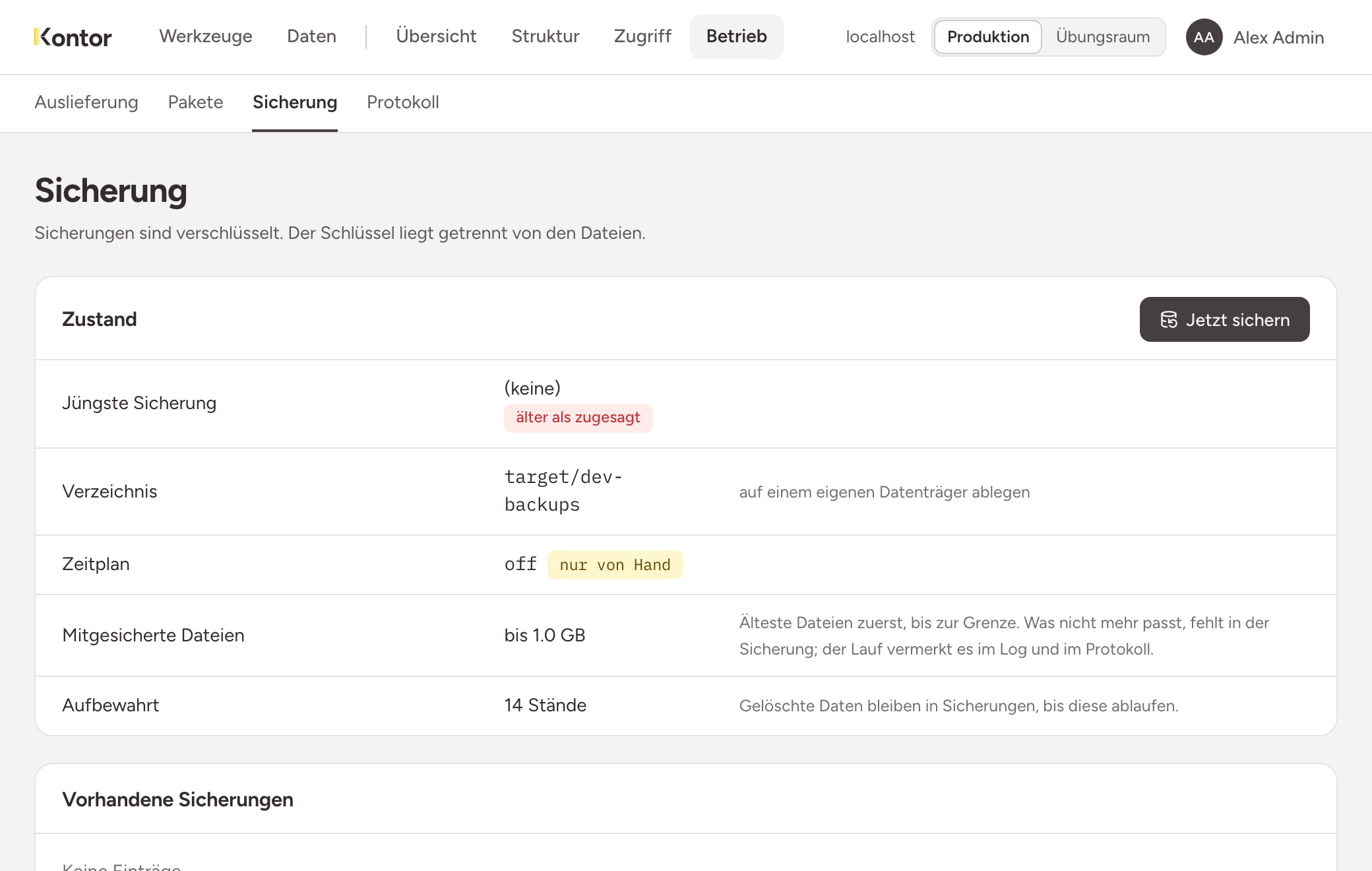
Reading the state
- Latest backup: when the instance last backed up. older than promised means: the latest backup is older than 30 hours, or there is none. Look here regularly. A schedule that quietly does nothing is otherwise noticed by nobody.
- Directory: where the instance writes the files.
- Schedule: when it backs up by itself. The default is daily at 02:30. manual only means: no schedule is running.
- Files included: the limit for files from buckets, 1 GB by default. The oldest files go in first. What no longer fits is missing from the backup. The run notes this in the audit log.
- Kept: how many states the instance keeps, 14 by default. It deletes older states.
Schedule, directory, limit and number of states are set by whoever operates the instance. They cannot be changed on the page.
What a backup contains
| In it | Not in it |
|---|---|
| All data of the collections | Sessions: whoever was signed in signs in again |
| People, roles, groups, memberships and permissions | Files above the limit |
| The structure of the collections | The reported errors of the tools |
| Access tokens | |
| The tool repository with its history | |
| The audit log | |
| Buckets and their files, up to the limit |
Backups are encrypted. The key is kept apart from the files. Whoever has only the files has nothing. Whoever loses the key loses the backups.
Deleted data stays in backups until they expire. Only then has a deletion taken effect everywhere.
The backup is on the same machine
Agree with operations who copies the directory to a second place regularly, and where the key is kept a second time.
Backing up by hand
Choose Back up now, for example before a larger change. The instance reports Backup written., and the new state appears under Available backups. If a backup is already running, it says so and does not start a second one.
Restoring
Every state under Available backups has the button Restore. The instance asks first and names what will be lost. A backup cannot be uploaded: the file has to be in the directory.
The following holds:
- The data goes back to the state of the backup: data, collections, roles, permissions and the tool repository. Anything written since then is gone.
- Everyone is signed out, including you.
- The audit log is kept in full. The instance never overwrites it. It also keeps the entries since the backup and the entry about the restore.
- No person disappears. People who joined since then stay, but keep no rights.
- The instance only adds access tokens. Every token of today stays as it is, and only what is missing comes from the backup. A token you have revoked since then stays revoked.
- Collections that exist only now are left standing. The instance never removes anything.
- It does not overwrite files that are already there. It puts back what is missing. A deleted file can come back this way with an older state.
The page Restored then shows what came back, what the instance left as it was, and whether structure and database match. An empty finding is the expected answer.